> ## Documentation Index
> Fetch the complete documentation index at: https://docs.kai-yan.com/llms.txt
> Use this file to discover all available pages before exploring further.
# Script Management
> Review drafts, review status, versions, and published script data.
## What this page is for
Script Management is the starting point for creating a draft, searching scripts, filtering by status, continuing an edit, and opening data for published work.
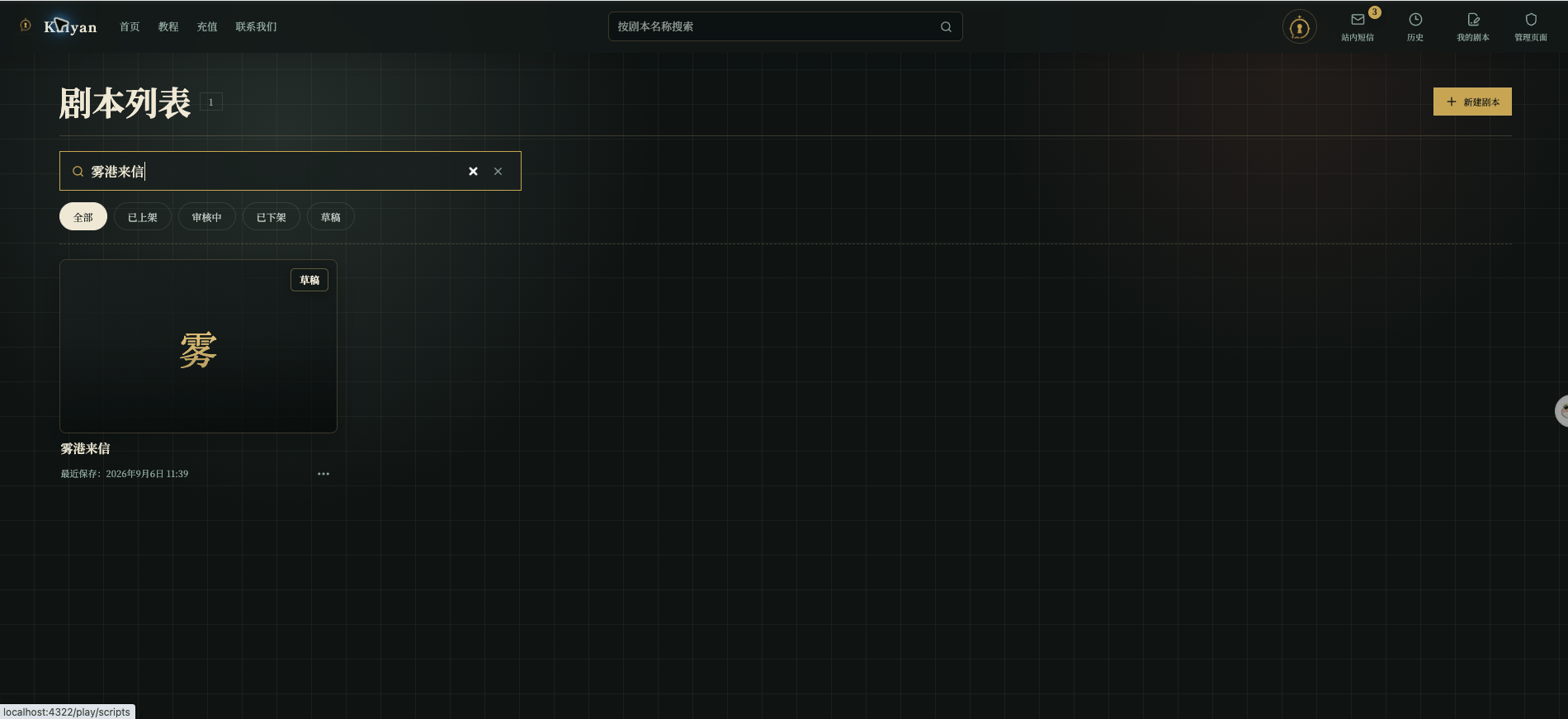 Each card can show a cover and title, status, series or chapter, version label, relevant time, and a more-actions button. A draft can be edited or deleted. A published script can be used as the starting point for a new draft instead of changing the live version directly.
## Filter and search
| Filter | Use it when |
| ----------- | ---------------------------------------------------- |
| All | You want every script. |
| Draft | You want to continue or clean up unfinished work. |
| In Review | You want to track a submitted version. |
| Published | You want the version players can play and its data. |
| Unpublished | You want to find a version removed from the catalog. |
Search can use the script title or series name. If no card appears, clear both the search text and the status filter before assuming the script is gone.
## Published data
Selecting a published card opens a data panel with play count, average turns, favorites, likes, and completions.
Each card can show a cover and title, status, series or chapter, version label, relevant time, and a more-actions button. A draft can be edited or deleted. A published script can be used as the starting point for a new draft instead of changing the live version directly.
## Filter and search
| Filter | Use it when |
| ----------- | ---------------------------------------------------- |
| All | You want every script. |
| Draft | You want to continue or clean up unfinished work. |
| In Review | You want to track a submitted version. |
| Published | You want the version players can play and its data. |
| Unpublished | You want to find a version removed from the catalog. |
Search can use the script title or series name. If no card appears, clear both the search text and the status filter before assuming the script is gone.
## Published data
Selecting a published card opens a data panel with play count, average turns, favorites, likes, and completions.
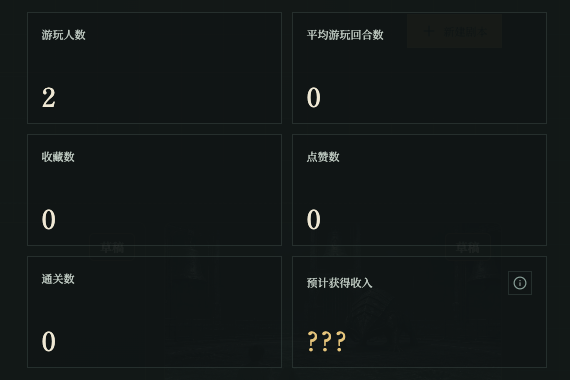 The current panel keeps an **Estimated Income** area but clearly says it is not supported yet. Do not treat it as paid income or infer a split, settlement date, or withdrawal status from play count.
If creator revenue is formally launched later, this area can explain the source of revenue, payable and settled amounts, settlement cycle, and permitted withdrawal method. Until those rules are published, leave the numbers to the product page.
The current panel keeps an **Estimated Income** area but clearly says it is not supported yet. Do not treat it as paid income or infer a split, settlement date, or withdrawal status from play count.
If creator revenue is formally launched later, this area can explain the source of revenue, payable and settled amounts, settlement cycle, and permitted withdrawal method. Until those rules are published, leave the numbers to the product page.