> ## Documentation Index
> Fetch the complete documentation index at: https://docs.kai-yan.com/llms.txt
> Use this file to discover all available pages before exploring further.
# Recommended Actions
> Open the game page’s suggestions when you are unsure what to do next.
## Where to find them
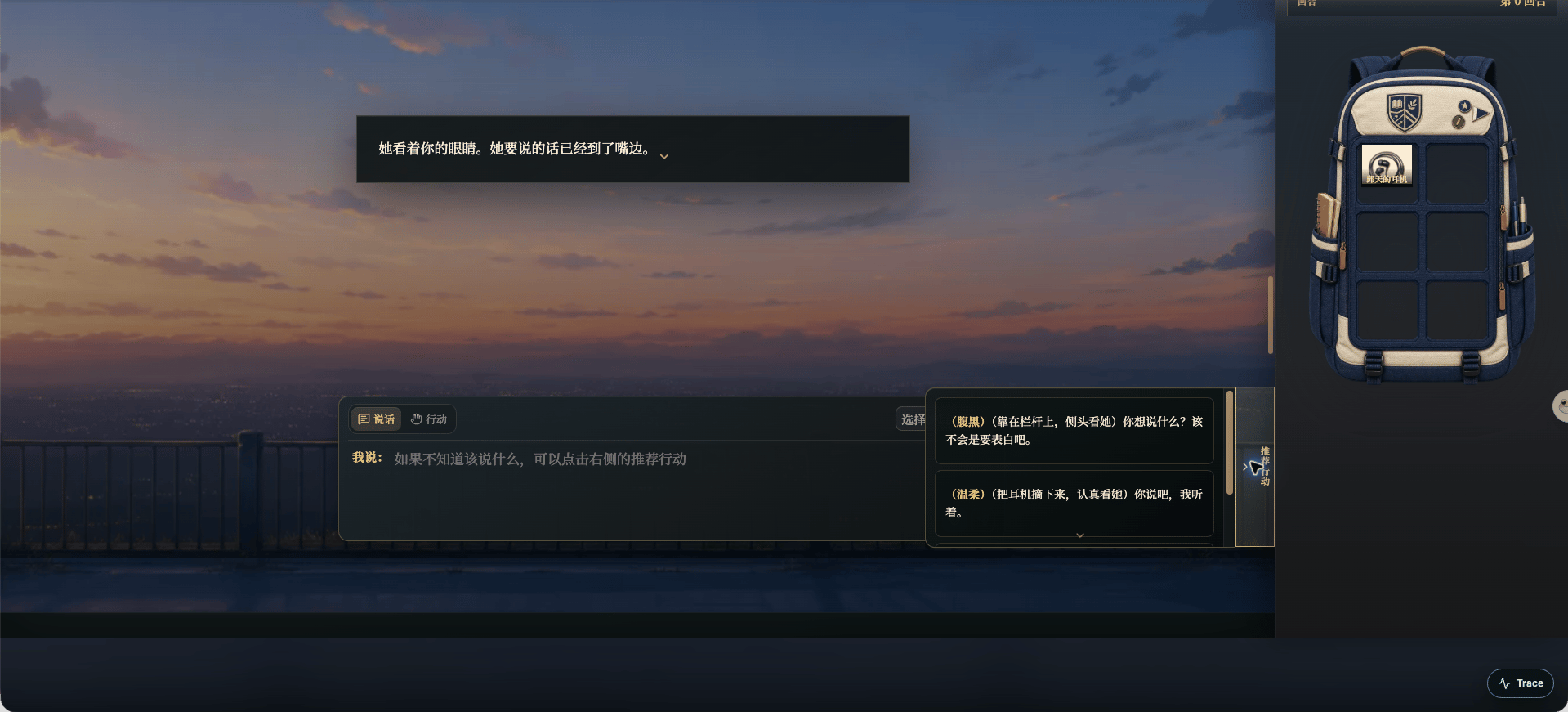
On the game page, open **Recommended Actions** beside the input area. When suggestions are available, the panel lists a few actions that fit the current scene.
 Some turns have no suggestions. Read the current scene and finish the ongoing opening or turn first.
## What happens when you select one
Selecting a suggestion sends it as your input for the current turn. It is a reference, not a required answer, so check that the action is really what you want your character to do.
If you want to change the wording, use the suggestion as an idea and write your own version in the input area instead.
## Speech or action
* **Speech** is something your character says: a question, reply, or position.
* **Action** is something your character does: observe, move, investigate, or try a method.
You can switch modes above the input box and review the text before sending. Suggestions change with the current turn and script.
Some turns have no suggestions. Read the current scene and finish the ongoing opening or turn first.
## What happens when you select one
Selecting a suggestion sends it as your input for the current turn. It is a reference, not a required answer, so check that the action is really what you want your character to do.
If you want to change the wording, use the suggestion as an idea and write your own version in the input area instead.
## Speech or action
* **Speech** is something your character says: a question, reply, or position.
* **Action** is something your character does: observe, move, investigate, or try a method.
You can switch modes above the input box and review the text before sending. Suggestions change with the current turn and script.